Help & Support
Quick answers, real responses, no chatbot maze.
Need a human? Email help@readytrainerone.com. We read and reply to every message ourselves.
Getting started
Which iPhones and iOS versions are supported?
RTO supports iPhones running iOS 17 or later. The app is iOS-only for now; Android and a web version are on the roadmap but do not have a public release date yet.
How do I connect Apple Health?
On first launch, RTO will ask for Health permissions. Grant access to as many categories as you're comfortable with — workouts, sleep, heart rate, weight, food, and medications cover the most useful patterns. You can change permissions any time in iOS Settings → Health → Data Access & Devices → Ready Trainer One.
What if I'm not on a GLP-1?
The app works fine without a logged GLP-1 dose schedule — you'll just see a less specialized version of the coaching. But RTO is genuinely built for the GLP-1-on-training experience; if that's not you, there are general-purpose fitness apps that will fit you better.
Using RTO
Coach & chat
The chat is your way to ask the coach anything grounded in your data. Examples:
- "How did my sleep affect readiness this week?"
- "Did my last dose change my training response?"
- "Why did my recovery drop on Tuesday?"
- "What patterns are you seeing this month?"
The coach is intentionally honest about what it doesn't know. If you ask it for medical advice or a diagnosis, it will decline and tell you to talk to your prescriber. That's by design.
On Free, you get 5 coach chats per day; the counter resets at midnight in your local time zone. Pro is unlimited.
These answers are AI-generated. The coach's replies are produced by Anthropic's Claude, not written by Ready Trainer One. They can be wrong or incomplete on any given question. If something the coach says would change your training, fueling, medication, or treatment, verify it with a clinician first.
Readiness score
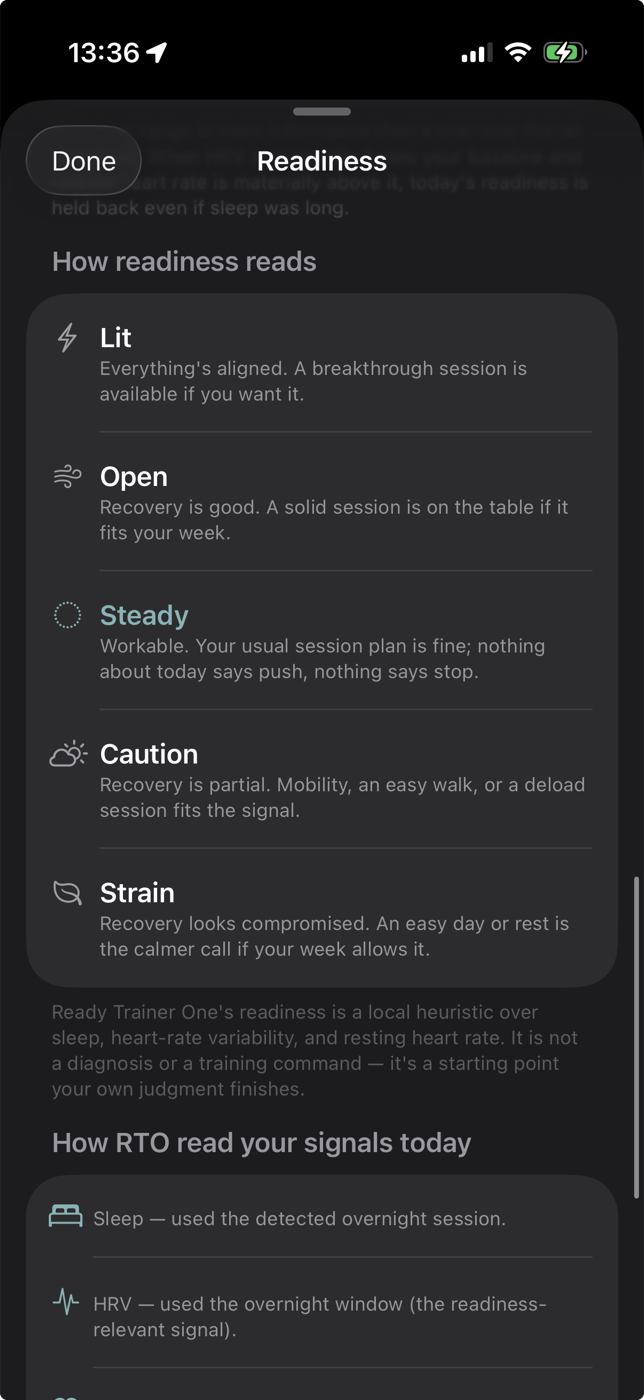
Readiness is RTO's read on whether today is a day to push, hold, or back off. It's a local heuristic built from your sleep, heart rate variability, and resting heart rate — not a diagnosis or a training command. It's a starting point your own judgment finishes.
There are five levels:
- Lit — Everything's aligned. A breakthrough session is available if you want it.
- Open — Recovery is good. A solid session is on the table if it fits your week.
- Steady — Workable. Your usual session plan is fine; nothing about today says push, nothing says stop.
- Caution — Recovery is partial. Mobility, an easy walk, or a deload session fits the signal.
- Strain — Recovery looks compromised. An easy day or rest is the calmer call if your week allows it.
Log — food and fluids
Logging is meant to feel like sending a quick text. You can log a meal three ways, and combine them:
- Type or dictate. Say or type something like "for lunch I had a rice and bean burrito". Siri works — long-press the input and dictate.
- Take a photo. Snap your plate or bowl. RTO's vision model identifies the items and estimates portions.
- Photo + text together. Add a description alongside the photo when context helps ("the burrito on the left is mine").
Water and fluids work the same way — just say "16 oz of water" or "a cold brew" and RTO logs it.
You can also say "I had the same breakfast as yesterday" and RTO will copy the prior meal forward.
History (Pro). Tap the history button to see your past meals. Tap any past meal to log it again for today — useful for repeat breakfasts or staple dinners.
Editing today's log. On the Today screen, swipe left on any meal or entry to delete it.
Meds
The Meds view shows GLP-1 users roughly how much medication is in their blood plasma — a pharmacokinetic estimate based on your logged doses, so you can see the rise, plateau, and tail across the week.
Appetite & side effects (Pro). Pro users can log appetite and any side effects they're feeling. The coach and chat take these into account when interpreting your readiness, food intake, and training patterns.
Memory
Memory is where the app shows you the trends it's discovering about you — patterns in your sleep, training response, dose timing, food behavior, and more. You can confirm a memory ("yes, that's true") to reinforce it, or delete one that's off. The more you curate, the better the coach and chat know you over time.
Settings
Settings is where you tune the parts of the app that don't change every day:
- HealthKit — confirm HealthKit is connected and review which categories RTO can read.
- Calendars — select or remove calendars for RTO to track. Calendar context helps the coach reason about your week.
- Goal Profile — edit your goals (weight, training, performance) to tune the coaching tone and recommendations.
- Medications & Supplements — change details related to your GLP-1, and see what other HealthKit-logged medications RTO knows about.
- Daily Brief (Pro) — toggle the daily brief on or off, and pick the time of day you want the notification.
- Show weight trends forecast — toggle a forecast on the Insights page showing where your weight is trending.
- Advanced — Bring your own Anthropic key. Enter and validate your own Anthropic API key, then pick the model you want the coach to use. With your own key, coach requests go directly from your iPhone to Anthropic — our server isn't in the path, and you won't hit our rate limits. Your key is stored in the iOS Keychain and never sent to us.
Subscriptions
How do I switch to Pro?
Open the app and go to Settings → Subscription. Pro is $3.99/month or $29.99/year, billed by the App Store. You can cancel any time in iOS Settings → [your name] → Subscriptions — your access continues through the end of the current period.
Restore a previous purchase
If you reinstalled the app or switched devices, open Settings → Subscription → Restore Purchases.
Privacy & data
Does RTO share my health data with anyone?
No. Your Apple Health data lives on your device. When you ask the coach a question, only the data needed to answer that one question is sent to our service, used to generate the reply, and then discarded. The full details are in our privacy policy.
How do I delete my data?
Delete the app — that clears all local data on your device. For the small amount of account-linked data on our server (Sign in with Apple identifier, subscription status, daily quotas), email help@readytrainerone.com with "delete my account" and the email tied to your Sign in with Apple, and we'll wipe it within 7 days.
Can I use my own Anthropic API key?
Yes. Settings → Advanced → Anthropic API Key. When you set your own key, coach requests go directly from your iPhone to Anthropic — our server isn't in the path, and you won't hit our rate limits. Your key is stored in the iOS Keychain and never sent to us.
Trouble?
The app won't read my health data
Check iOS Settings → Health → Data Access & Devices → Ready Trainer One and make sure the categories you care about are toggled on. Then in the RTO app, pull down on the Today screen to refresh.
The coach is taking a long time to reply
The first reply each day may take a few seconds while data is gathered. Subsequent replies are faster. If a reply takes more than 30 seconds, it's likely a temporary issue with the language model provider — try again in a minute.
Something else broke
Email help@readytrainerone.com with the iOS version, iPhone model, and a description of what you saw. Screenshots help.
Medical sources & limits
The health information RTO uses — training and activity safety, sleep, sports nutrition, GLP-1 medication context, hydration, and the AI / platform privacy posture — is anchored to primary sources listed in the Medical Sources & Limits registry. Every entry there carries a status label (Core source, Clinical reference, Candidate under review), plus an explicit "What these sources do not mean" section.
Important reminder
RTO is not a diagnostic tool, not medical advice, and not a substitute for your prescriber, your doctor, or your trainer. If you're experiencing a medical emergency, call your local emergency number. If you have questions about your medication, talk to your prescriber.