FAQ
Apple HealthKit, your data, and how RTO connects to both.
RTO reads from Apple HealthKit on your iPhone. The more complete your HealthKit data is, the more useful RTO becomes. These are the questions we hear most often from people getting set up.
Privacy & trust
How the AI coaching features handle your data, what we send and don't send, and where to find the medical sources behind RTO's health information. See the Privacy Policy for the legally complete version.
What does Ready Trainer One send to the AI, and what doesn't it send?
When you use Chat, Daily Brief, Today Hero, or food parsing, RTO sends a bounded request to Anthropic containing only what's needed to answer it: your question and recent chat context, bounded Apple Health summaries (sleep, HRV, resting heart rate, workouts, energy, nutrition, hydration, weight or body composition) when relevant, food entries and meal photos or photo labels for food parsing, medication and supplement timing, appetite or symptom check-ins, your goal profile and app memory, and calendar summaries — only if you've enabled calendar access.
We do not intentionally send your name, email, Apple ID, or Ready Trainer One account identifier to Anthropic. Your messages, selected photos, and health context may still contain personal information (you might say your own name in a message, or include a face in a meal photo), so treat each request like any message you'd send to a third-party service.
Never sent: raw HealthKit export, raw calendar contents, API keys, advertising identifiers, and unrelated health history. Ready Trainer One does not sell this data or use it for advertising, marketing, or cross-app tracking.
Who's the AI provider, and where does the request actually go?
AI provider: Anthropic. Anthropic currently provides the Claude models used for AI coaching. Anthropic's API terms say Customer Content is not used to train Anthropic models — see their Commercial Terms and Data Processing Addendum.
There are two possible paths for an AI request:
- Managed path (signed-in users). The request leaves your iPhone, goes to Ready Trainer One services at
readytrainerone.com, which relay it to Anthropic and return the response. We use this hop to authenticate you, enforce per-account quotas, and route the request — relay logs are body-free and PHI-minimized. The infrastructure provider is Cloudflare, bound to service-provider protections. - Bring-Your-Own-Key (BYO) path. If you enter your own Anthropic API key under Settings → Advanced, the request goes from your iPhone directly to Anthropic using your key. Our server is not in the path; we never see the request, the response, or your key.
How do I withdraw consent for AI features?
Open Settings → Privacy & Safety in the app and withdraw consent. Chat, Daily Brief, food parsing, and Today Hero coach requests are blocked until you re-accept. Manual food logging, on-device summaries, and the rest of the app continue to work.
You can re-grant consent at any time from the same screen.
What happens if you change AI providers in the future?
If Ready Trainer One changes AI providers or materially changes what data is shared, the app will ask for consent again before the change takes effect. The Privacy Policy will be updated in the same release, and the app's in-app Privacy & Safety page will name the new provider.
Until you re-consent, AI-powered features are paused — same posture as a fresh install.
How do I know when I'm reading AI-generated content?
Any Coach answer, Daily Brief entry, Today Hero card, or parsed-meal panel comes from Anthropic's Claude — the AI model. Anything else in the app (readiness score, HealthKit data, your own logs) is either your own data or a local computation, not AI output.
Inside the app, model-backed surfaces carry a small AI indicator so you can tell at a glance. For the full disclosure of what gets sent, see Privacy Policy §3 — specifically the AI-generated content paragraph in §3h.
Can the coach be wrong?
Yes. AI output can be incomplete, out of date, or plain incorrect on any given request. That includes health-related answers. The model is drawing on general framing plus the bounded context RTO shares from your data — it isn't a diagnosis, and it isn't a personalized clinical read.
The Medical Sources & Limits page has a "What these sources do not mean" section that spells out the limits in detail. If the coach says something that would change your training, fueling, medication, or treatment, verify it with a clinician first. Ready Trainer One is not medical advice.
Where can I see the medical sources?
The Medical Sources & Limits page is RTO's public source registry. It lists every primary reference behind RTO's health information — AI health literacy, training and activity safety, sports nutrition, sleep, GLP-1 medication context, hydration, and the AI / platform privacy posture. Every link points to a primary source (CDC, MedlinePlus/NIH, the National Academy of Medicine, professional-society position stands, Apple, or Anthropic itself).
The same page is reachable in-app from Settings → Privacy, AI & medical sources, plus from health-heavy surfaces like Today Hero, Daily Brief, the Meds tab, and Chat health answers.
How do sources work? What do the status labels mean?
Every entry on the Medical Sources & Limits registry carries one of three status labels:
- Core source — drives a product guardrail or sets the framing for an educational surface. Authoritative clinical, professional-society, platform-owner, or patient-education reference.
- Clinical reference — peer-reviewed position stand or society publication used for narrower clinical interpretation.
- Candidate under review — a source we're tracking but have not yet adopted into any guardrail. Listed for transparency; do not infer endorsement.
Draft-only papers and pre-prints are not listed as accepted sources. If a draft becomes a final accepted reference, it moves into the relevant section with an explicit label.
A "Core source" label means the source informs a product guardrail — not that the source has reviewed RTO. The registry's "What these sources do not mean" section spells out the limits in detail.
Is Ready Trainer One medical advice?
No. Ready Trainer One is not a medical device. It does not diagnose or treat disease, and it does not change your medication dosing. AI output can be wrong or incomplete. Decisions about training load, fueling, medication, or treatment belong with the qualified humans who know you — your doctor, prescriber, dietitian, or coach.
If you're in crisis, contact a medical professional or your local emergency services.
HealthKit, devices, and your data
How RTO connects to Apple HealthKit on your iPhone — and how to get your sleep, food, doses, and weight into it in the first place.
What is Apple HealthKit?
Apple HealthKit is the framework Apple built so apps can read and write health data on your iPhone — with your explicit permission. Think of it as a private, on-device hub for everything your devices, apps, and you log: workouts, sleep, heart rate, weight, medications, nutrition, and more.
The Health app is the visual front end — the charts and screens you can tap through. HealthKit is the data layer underneath that lets other apps talk to that hub. RTO reads from HealthKit so it never has to ask you to manually re-enter what other apps already know about your training and your body.
How do I get my data — workouts, medications, sleep — into HealthKit?
Most modern fitness devices and health apps will automatically write to HealthKit once you grant them permission. The easiest single source is an Apple Watch — it logs sleep, heart rate, workouts, and heart rate variability without any additional setup.
Other common ways data lands in HealthKit:
- RTO itself — log food in RTO by photo or natural language; entries are written back to HealthKit. (See the food-logging question below.)
- Third-party trackers (Garmin, Whoop, Oura, Fitbit) — install their iPhone app and allow HealthKit access in its settings.
- Workout apps (Strava, Peloton, Nike Run Club, TrainerRoad) — your sessions sync to HealthKit when permission is granted.
- Smart scales (Withings, Eufy, Renpho) — weight and body composition flow in automatically.
- Other nutrition apps (MyFitnessPal, Cronometer, Lose It!) — food and macros, if you already use one.
- The Apple Health app itself — for anything that doesn't have a connected device, you can log it by hand.
What about my GLP-1 doses?
Apple's Health app includes the ability to log medications and set reminders. When you log your GLP-1 medication and dose in HealthKit, it will be accessible to RTO — and RTO will use that schedule to interpret the rest of your data (recovery shifts after a dose, appetite changes, training response).
In Health, go to Browse → Medications → Add a Medication, search for your GLP-1 (Ozempic, Mounjaro, Wegovy, Zepbound, etc.), then enter your dose and set the schedule. Health will send reminders, log each dose you confirm, and quietly hand that information to RTO.
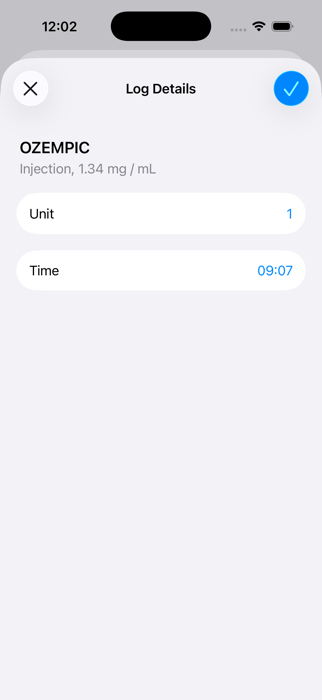
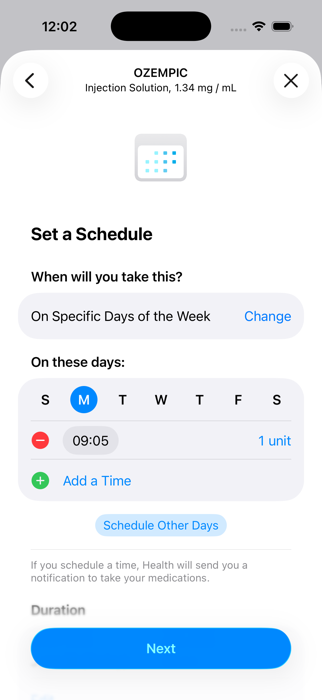
Alternatively, you can log your doses directly in the RTO app; however, doses logged in RTO won't flow back into HealthKit. If you want one canonical record of your medication history that follows you to other apps and to your prescriber, log it in Health.
How does food logging work in RTO?
RTO is built to make food logging feel like sending a quick text — not filling out a database form. You log a meal two ways:
- Take a photo. Snap your plate, your bowl, your menu. RTO's vision model identifies the items, estimates portions, and calculates nutrition. Confirm or correct, then save.
- Describe it in plain language. Type or dictate something like "for lunch I had a bowl with half a cup of quinoa and half a cup of fried tofu" and RTO parses the meal, ingredients, and amounts into proper nutrition entries.
Every meal you log in RTO is written back to Apple HealthKit, so your food data joins the rest of your health record — available to other apps, visible in the Health app, and useful when you share data with a coach or dietitian.
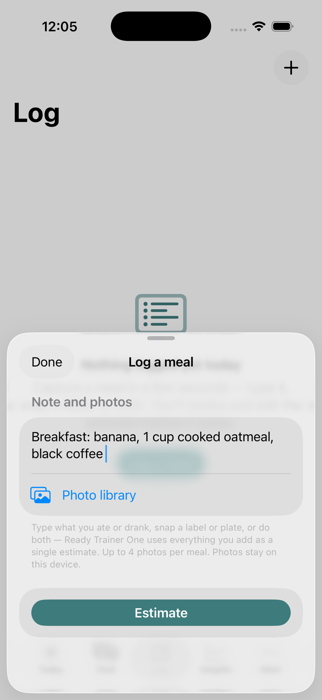
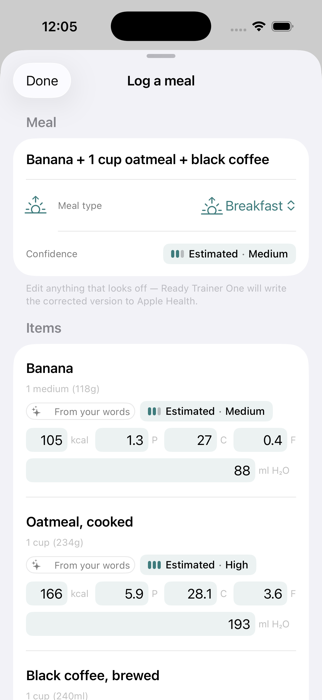
On the Free plan, you get 3 photo food logs per day. On Pro, photo logging is unlimited. Natural-language entries don't count against the photo limit.
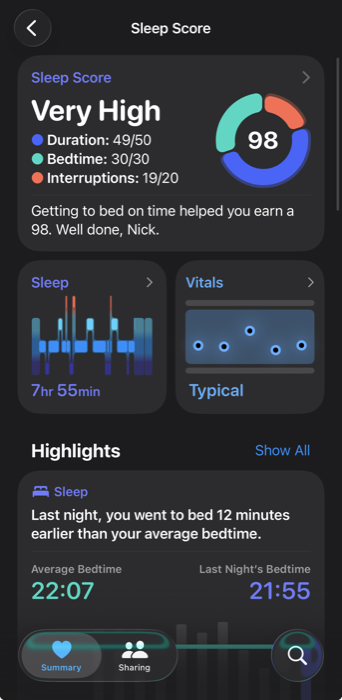
How do I get sleep data?
The easiest way is to wear an Apple Watch when you sleep — it logs sleep stages, duration, and a Sleep Score that RTO can read directly.
Any other smart sleep tracker that integrates with HealthKit will also work — Whoop, Oura, Garmin, and most fitness rings or watches export sleep data via HealthKit. If you don't have a smart sleep device, using the Sleep Schedule on your iPhone (Health → Browse → Sleep → Schedule) will log sleep hours based on when you're in bed.
How can I get weight data?
Any smart scale that supports HealthKit will log your weight directly into HealthKit and make it available to RTO. Withings, Eufy, Renpho, and most major scales work this way — step on, sync, done.
If you don't have a smart scale, you can enter your weight manually in the Apple Health app (Browse → Body Measurements → Weight → Add Data) and it will be available to RTO. Even a weekly weigh-in is enough for RTO to start surfacing meaningful trends.
Question we didn't cover? For setup help, subscription questions, or anything else, see Help & Support or email help@readytrainerone.com.